Getting Started
Install and draw from a script.
Install
- Copy the
addons/geomfolder into your project. - Restart Godot.
The addon needs Godot 4.6 or newer. It runs on Windows, Linux, macOS and the web, under the Forward+, Mobile and Compatibility renderers.
If the classes work but their F1 help is blank, restart the editor once. Godot merges extension docs into its help only on the launch after a fresh install or upgrade.
Drawing
extends Node2D

func _process(_delta: float) -> void:
	GeomDraw.reset_all_draw_states()

	GeomDraw.color = Color(0.42, 0.85, 1.0)
	GeomDraw.thickness = 6.0

	GeomDraw.disc_2d(Vector2(160, 150), 60.0)
	GeomDraw.ring_2d(Vector2(320, 150), 60.0)
	GeomDraw.regular_polygon_2d(Vector2(480, 150), 60.0, 6)
	GeomDraw.line_2d(Vector2(100, 260), Vector2(540, 260))
using Godot;
public partial class HelloShapes : Node2D
{
public override void _Process(double delta)
{
Geom.Draw.ResetAllDrawStates();
Geom.Draw.Color = new Color(0.42f, 0.85f, 1.0f);
Geom.Draw.Thickness = 6.0f;
Geom.Draw.Disc2D(new Vector2(160, 150), 60.0f);
Geom.Draw.Ring2D(new Vector2(320, 150), 60.0f);
Geom.Draw.RegularPolygon2D(new Vector2(480, 150), 60.0f, 6);
Geom.Draw.Line2D(new Vector2(100, 260), new Vector2(540, 260));
}
}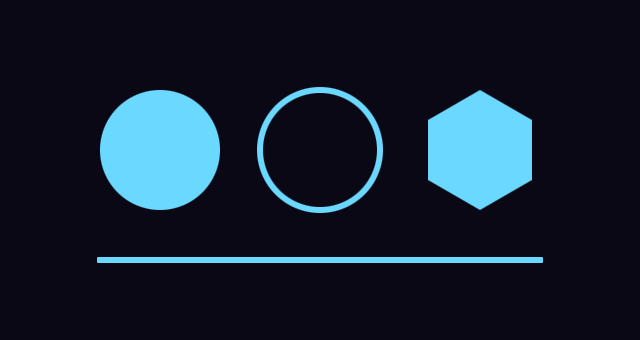
The shapes we used are disc_2d, ring_2d, regular_polygon_2d and line_2d.
You can find other shape calls on GeomDraw.
reset_all_draw_states() puts the draw state back to its defaults. The state
is global and persists between frames.
color and thickness apply to every call after them. Consecutive shapes of
one type merge into one draw call.
The _2d suffix marks canvas calls. The 3D versions have the same names
without it and take a Vector3.
Namespace
Because of the global namespace everything in GDScript is prefixed with Geom (GeomDraw, GeomDisc2D, etc) to prevent the addon from having collisions with a class_name in your project.
You can alias a name, var Draw := GeomDraw, at the top of each script for a shorter name.
Web Export
If you plan to use this with a web export you’ll need to turn on Extension Support in the web export preset. The addon ships a threaded and a non-threaded build, and Godot picks the one matching the export. godot-rust considers web support experimental. The web build runs on the Compatibility renderer, and the demo at madebygare.itch.io/geom runs on it.