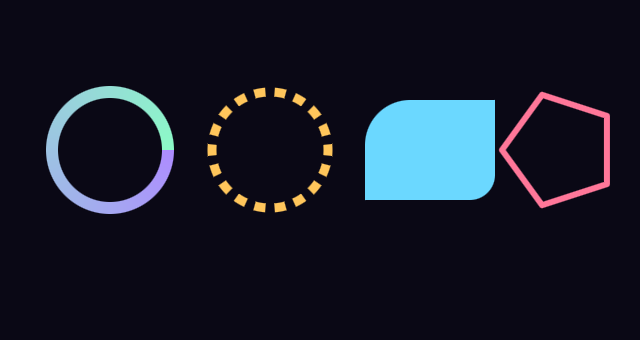
Draw State
Color, thickness, dashes, gradients, spaces and transforms.
Styling is done through properties on GeomDraw. Setting one changes every shape drawn after it. These properties represent the draw state.
Spaces
thickness_space, radius_space and size_space choose how a thickness,
radius or size is measured:
Geom.SPACE_WORLD: world units, such as a node’sposition.Geom.SPACE_VIEWPORT_PIXELS: the viewport’s pixels. A thickness of 2 stays 2 pixels wide at any zoom.Geom.SPACE_VIEWPORT_PERCENT: a percent of the viewport’s shorter side, like CSSvmin, so one unit is about 11 pixels at 1080p.
Gradients
Every node has a fill property that takes a gradient resource. There are
four:
GeomFillRadial:innertoouter.GeomFillAngular:starttoend, around the sweep.GeomFillLinear:starttoendalong an axis, turned byangle_degrees.GeomFillCorners: a color at each corner. On the canvasais top-left andb,c,dfollow clockwise; in 3Dais bottom-left and they follow counterclockwise. On a disc or polygon the axes are sweep and radius, soaandbare the inner edge.
With fill empty, the shape uses color.
These gradients can also be set in code with set_fill_radial, set_fill_angular,
set_fill_linear and set_fill_corners. set_fill_solid and set_fill(null) can always be used to unset the gradient.
Dashes
dashed = true makes lines and the outlines of shapes dashed.
dash_size is the length of a dash and dash_spacing the gap after it.
dash_space sets how they’re measured:
Geom.DASH_RELATIVE, the default: multiples of the thickness. Adash_sizeof 2 with a thickness of 12 units would be 24 units long.Geom.DASH_WORLD: length in world units.Geom.DASH_FIXED_COUNT:dash_sizeis the number of dashes to fit around the shape.dash_spacingis still the gap relative to the dash.
dash_spaceandthickness_spaceare independent. With thickness inSPACE_VIEWPORT_PIXELSand dashes inDASH_WORLD, zooming in makes the dashes longer while the wall stays the same width.
dash_snap fits the pattern to the shape. SNAP_TILING stretches it so a
whole number of dashes fits around a closed shape and the seam disappears.
SNAP_END_TO_END puts a whole dash at each end of a line or arc.
dash_type can be set to DASH_BASIC, DASH_ANGLED, or DASH_ROUNDED.
dash_offset slides the pattern along the shape.
Outlines
border = true draws an outline, thickness wide, instead of a fill.
Discs and polygons don’t support border. ring_2d and arc_2d are the outline form of discs. A closed polyline can be used to draw an outlined polygon.
For a filled shape with an outline, draw it twice. First filled, then with border on.
Corners
corner_radii takes a Vector4 to round a rectangle’s corners. Canvas shapes start with
x at the top-left and follow clockwise. 3D shapes start with x at the bottom-left and follow counterclockwise. Each value is a fraction of half the shorter side.
set_corner_roundness() sets all four to one value.
roundness rounds a regular polygon’s corners, 0 to 1.
Transforms
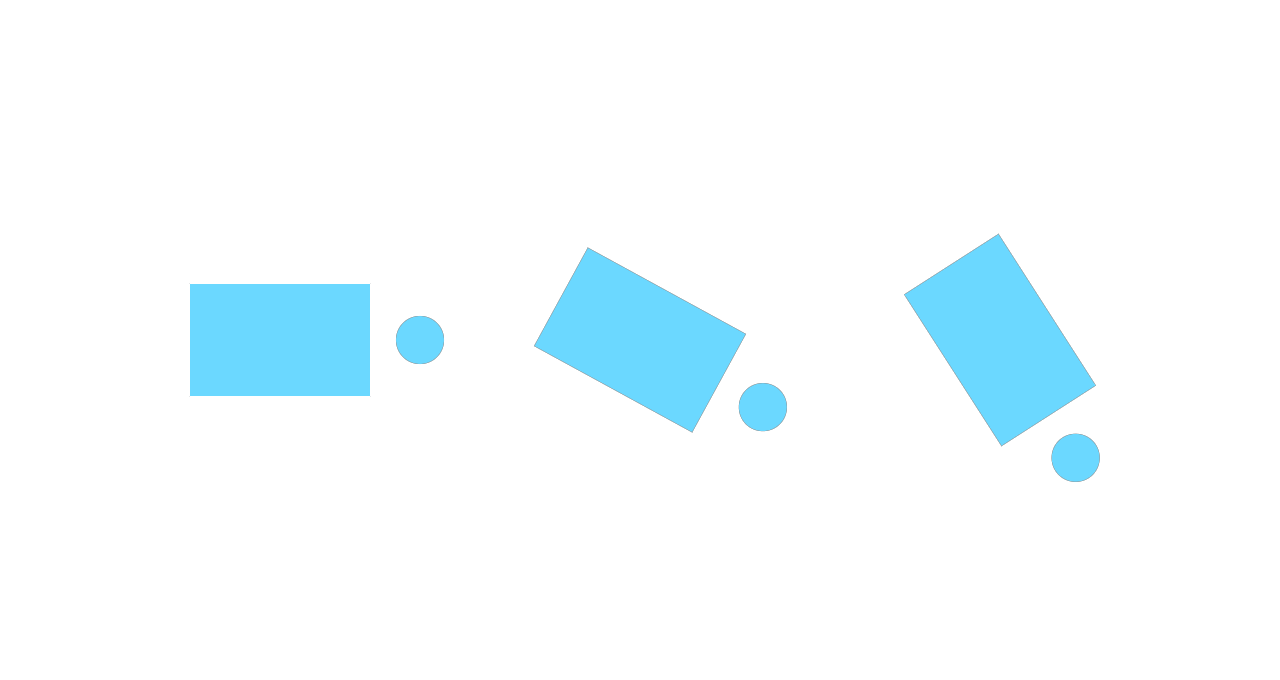
Every draw’s position goes through transform_2d on the canvas or transform in 3D. Setting one moves, turns and scales everything drawn after it.
extends Node2D

func _process(_delta: float) -> void:
	GeomDraw.reset_all_draw_states()
	GeomDraw.color = Color(0.42, 0.85, 1.0)

	GeomDraw.transform_2d = Transform2D(0.0, Vector2(140, 170))
	GeomDraw.rect_2d(Vector2.ZERO, Vector2(90, 56))
	GeomDraw.disc_2d(Vector2(70, 0), 12.0)

	GeomDraw.transform_2d = Transform2D(0.5, Vector2(320, 170))
	GeomDraw.rect_2d(Vector2.ZERO, Vector2(90, 56))
	GeomDraw.disc_2d(Vector2(70, 0), 12.0)

	GeomDraw.transform_2d = Transform2D(1.0, Vector2(500, 170))
	GeomDraw.rect_2d(Vector2.ZERO, Vector2(90, 56))
	GeomDraw.disc_2d(Vector2(70, 0), 12.0)
using Godot;
public partial class Transforms : Node2D
{
public override void _Process(double delta)
{
Geom.Draw.ResetAllDrawStates();
Geom.Draw.Color = new Color(0.42f, 0.85f, 1.0f);
Geom.Draw.Transform2D = new Transform2D(0.0f, new Vector2(140, 170));
Geom.Draw.Rect2D(Vector2.Zero, new Vector2(90, 56));
Geom.Draw.Disc2D(new Vector2(70, 0), 12.0f);
Geom.Draw.Transform2D = new Transform2D(0.5f, new Vector2(320, 170));
Geom.Draw.Rect2D(Vector2.Zero, new Vector2(90, 56));
Geom.Draw.Disc2D(new Vector2(70, 0), 12.0f);
Geom.Draw.Transform2D = new Transform2D(1.0f, new Vector2(500, 170));
Geom.Draw.Rect2D(Vector2.Zero, new Vector2(90, 56));
Geom.Draw.Disc2D(new Vector2(70, 0), 12.0f);
}
}
A flat 3D shape lies in the plane of transform. billboard makes it face the
camera instead; see the solids guide.
Scoped State
To change state for a few shapes, save it with push_state(), make the
changes, and restore it with pop_state().
extends Node2D

func _process(_delta: float) -> void:
	GeomDraw.reset_all_draw_states()
	GeomDraw.thickness = 4.0

	GeomDraw.ring_2d(Vector2(120, 170), 60.0)

	## Set a thicker style for one ring
	GeomDraw.push_state()
	GeomDraw.thickness = 12.0
	GeomDraw.ring_2d(Vector2(320, 170), 60.0)
	## Restore the previous style
	GeomDraw.pop_state()

	GeomDraw.ring_2d(Vector2(520, 170), 60.0)
using Godot;
public partial class PushState : Node2D
{
public override void _Process(double delta)
{
Geom.Draw.ResetAllDrawStates();
Geom.Draw.Thickness = 4.0f;
Geom.Draw.Ring2D(new Vector2(120, 170), 60.0f);
//# Set a thicker style for one ring
Geom.Draw.PushState();
Geom.Draw.Thickness = 12.0f;
Geom.Draw.Ring2D(new Vector2(320, 170), 60.0f);
//# Restore the previous style
Geom.Draw.PopState();
Geom.Draw.Ring2D(new Vector2(520, 170), 60.0f);
}
}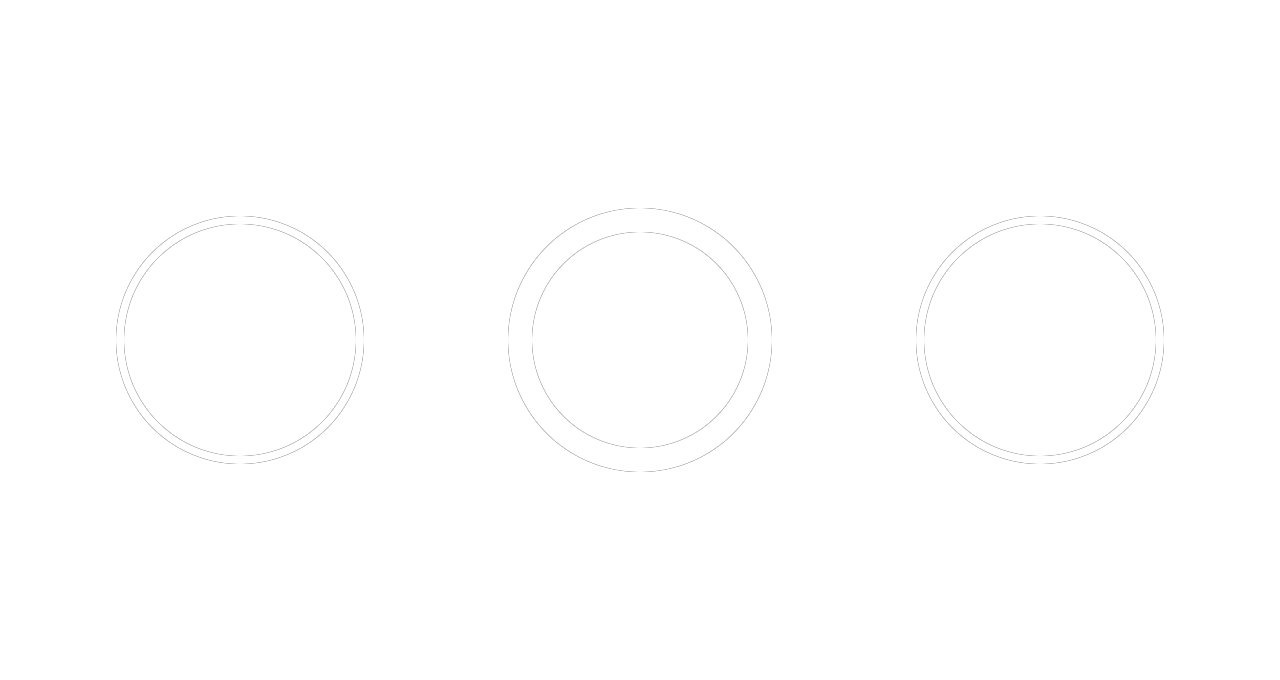
pop_state() puts everything back, the transform included. Saved states
are a stack: each pop restores the most recent push.
A push with no pop is reported at the end of the frame and the state goes back to what it was before the first push, and the stack is cleared.
Example
extends Node2D

func _process(_delta: float) -> void:
	GeomDraw.reset_all_draw_states()

	GeomDraw.radius_space = Geom.SPACE_VIEWPORT_PIXELS
	GeomDraw.thickness_space = Geom.SPACE_VIEWPORT_PIXELS

	# A gradient around a ring.
	GeomDraw.set_fill_angular(Color(0.68, 0.55, 1.0), Color(0.55, 0.98, 0.78))
	GeomDraw.thickness = 12.0
	GeomDraw.ring_2d(Vector2(110, 150), 58.0)
	GeomDraw.set_fill(null)  # Clears the gradient

	# Dashes.
	GeomDraw.dashed = true
	GeomDraw.dash_space = Geom.DASH_FIXED_COUNT
	GeomDraw.dash_size = 18.0
	GeomDraw.dash_spacing = 0.45
	GeomDraw.thickness = 9.0
	GeomDraw.ring_2d_colored(Vector2(270, 150), 58.0, Color(1.0, 0.78, 0.36))
	GeomDraw.dashed = false

	# Rectangles with rounded corners.
	GeomDraw.corner_radii = Vector4(0.9, 0.0, 0.5, 0.0)
	GeomDraw.rect_2d_colored(Vector2(430, 150), Vector2(130, 100),
		Color(0.42, 0.85, 1.0))
	GeomDraw.corner_radii = Vector4.ZERO

	# A filled shape with an outline using two draws
	GeomDraw.thickness = 6.0
	GeomDraw.regular_polygon_2d_colored(Vector2(560, 150), 58.0, 5,
		Color(1.0, 0.47, 0.6))
	GeomDraw.border = true
	GeomDraw.regular_polygon_2d_colored(Vector2(560, 150), 58.0, 5,
		Color(0.42, 0.85, 1.0))
	GeomDraw.border = false
using Godot;
public partial class Styling : Node2D
{
public override void _Process(double delta)
{
Geom.Draw.ResetAllDrawStates();
Geom.Draw.RadiusSpace = Geom.ThicknessSpace.ViewportPixels;
Geom.Draw.ThicknessSpace = Geom.ThicknessSpace.ViewportPixels;
// A gradient around a ring.
Geom.Draw.SetFillAngular(new Color(0.68f, 0.55f, 1.0f), new Color(0.55f, 0.98f, 0.78f));
Geom.Draw.Thickness = 12.0f;
Geom.Draw.Ring2D(new Vector2(110, 150), 58.0f);
Geom.Draw.SetFill(null); // Clears the gradient
// Dashes.
Geom.Draw.Dashed = true;
Geom.Draw.DashSpace = Geom.DashSpace.FixedCount;
Geom.Draw.DashSize = 18.0f;
Geom.Draw.DashSpacing = 0.45f;
Geom.Draw.Thickness = 9.0f;
Geom.Draw.Ring2DColored(new Vector2(270, 150), 58.0f, new Color(1.0f, 0.78f, 0.36f));
Geom.Draw.Dashed = false;
// Rectangles with rounded corners.
Geom.Draw.CornerRadii = new Vector4(0.9f, 0.0f, 0.5f, 0.0f);
Geom.Draw.Rect2DColored(new Vector2(430, 150), new Vector2(130, 100),
new Color(0.42f, 0.85f, 1.0f));
Geom.Draw.CornerRadii = Vector4.Zero;
// A filled shape with an outline using two draws
Geom.Draw.Thickness = 6.0f;
Geom.Draw.RegularPolygon2DColored(new Vector2(560, 150), 58.0f, 5,
new Color(1.0f, 0.47f, 0.6f));
Geom.Draw.Border = true;
Geom.Draw.RegularPolygon2DColored(new Vector2(560, 150), 58.0f, 5,
new Color(0.42f, 0.85f, 1.0f));
Geom.Draw.Border = false;
}
}