
Styling what you draw
Color, thickness, dashes, gradients, and the space sizes are read in.
Every shape is drawn with the current draw state. Set the state, then draw; the
state persists until something changes it, which is why reset_all_draw_states()
at the top of a _process is worth the line.
extends Node2D
## Draw state: color, thickness, dashes, gradients, and the space sizes are
## measured in. Each block below sets state, then draws with it.


func _process(_delta: float) -> void:
	GeomDraw.reset_all_draw_states()

	# Sizes have a space. PIXELS holds a size on screen whatever the zoom;
	# METERS is in the shape's own units and scales with the canvas.
	GeomDraw.radius_space = Geom.SPACE_PIXELS
	GeomDraw.thickness_space = Geom.SPACE_PIXELS

	# A gradient around a ring, from `color` to `color_end`.
	GeomDraw.color_mode = Geom.COLOR_ANGULAR
	GeomDraw.color = Color(0.68, 0.55, 1.0)
	GeomDraw.color_end = Color(0.55, 0.98, 0.78)
	GeomDraw.thickness = 12.0
	GeomDraw.ring_2d(Vector2(110, 150), 58.0)
	GeomDraw.color_mode = Geom.COLOR_SINGLE

	# Dashes. dash_size and dash_spacing are read in dash_space, which defaults
	# to RELATIVE -- multiples of the wall's thickness, not lengths.
	GeomDraw.dashed = true
	GeomDraw.dash_space = Geom.DASH_FIXED_COUNT
	GeomDraw.dash_size = 18.0
	GeomDraw.dash_spacing = 0.45
	GeomDraw.thickness = 9.0
	GeomDraw.ring_2d_colored(Vector2(270, 150), 58.0, Color(1.0, 0.78, 0.36))
	GeomDraw.dashed = false

	# Rectangles round per corner, clockwise from bottom-left, as fractions of
	# the shorter half-side.
	GeomDraw.corner_radii = Vector4(0.9, 0.0, 0.5, 0.0)
	GeomDraw.rect_2d_colored(Vector2(430, 150), Vector2(130, 100),
		Color(0.42, 0.85, 1.0))
	GeomDraw.corner_radii = Vector4.ZERO

	# Outlines are their own calls rather than a fill flag.
	GeomDraw.thickness = 6.0
	GeomDraw.regular_polygon_border_2d_colored(Vector2(560, 150), 58.0, 5,
		Color(1.0, 0.47, 0.6))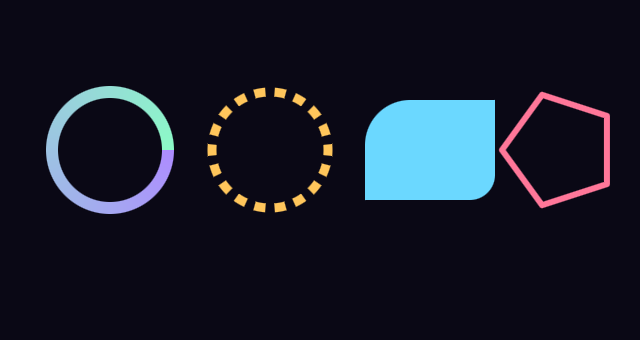
Sizes have a space
thickness_space, radius_space and size_space each choose how a number is
read:
-
Geom.SPACE_METERS— the shape’s own units. A radius of 60 is 60 world units, and shrinks as the camera pulls back or the canvas zooms out. -
Geom.SPACE_PIXELS— screen pixels. A thickness of 2 stays 2 pixels wide at any zoom, which is what an editor overlay or a HUD generally wants. -
Geom.SPACE_VIEWPORT— a fraction of the viewport. 100 units span its shorter side, so a value of 1 is one percent of it and a shape holds its proportions at any resolution. The same idea as CSSvmin.One unit is about 11 pixels at 1080p, which is worth knowing before you pick a number. A badge radius is around 4, a half-height ring 25 — comfortable. Strokes come out below 1: a readable one is about 0.5. If a stroke should stay a fixed number of pixels instead of scaling, that is what
Geom.SPACE_PIXELSis for.
A node’s scale multiplies the size whichever space you choose.
Dashes read their own space too
dash_size and dash_spacing are read in dash_space, and the default is
DASH_RELATIVE — multiples of the wall’s thickness, not lengths. On a wall 12
units thick, dash_size = 26 is a dash 312 units long. This catches people out.
Geom.DASH_RELATIVEkeeps dashes square as the thickness changes.Geom.DASH_METERSreads them as lengths.Geom.DASH_FIXED_COUNTtakes a number of dashes to fit around the shape and works the period out from the perimeter, which is usually what you want on a ring.
On a closed shape, set dash_snap to Geom.SNAP_TILING so a whole number of
periods fits and the pattern meets itself where the shape closes.
Outlines are separate calls
There is no fill flag. rect_2d fills, rect_border_2d outlines, and the same
pattern holds for triangles, quads and regular polygons. The outlined versions
use thickness; the filled ones ignore it.